9. cvičení
IPv6 over GRE a IPsec tunel
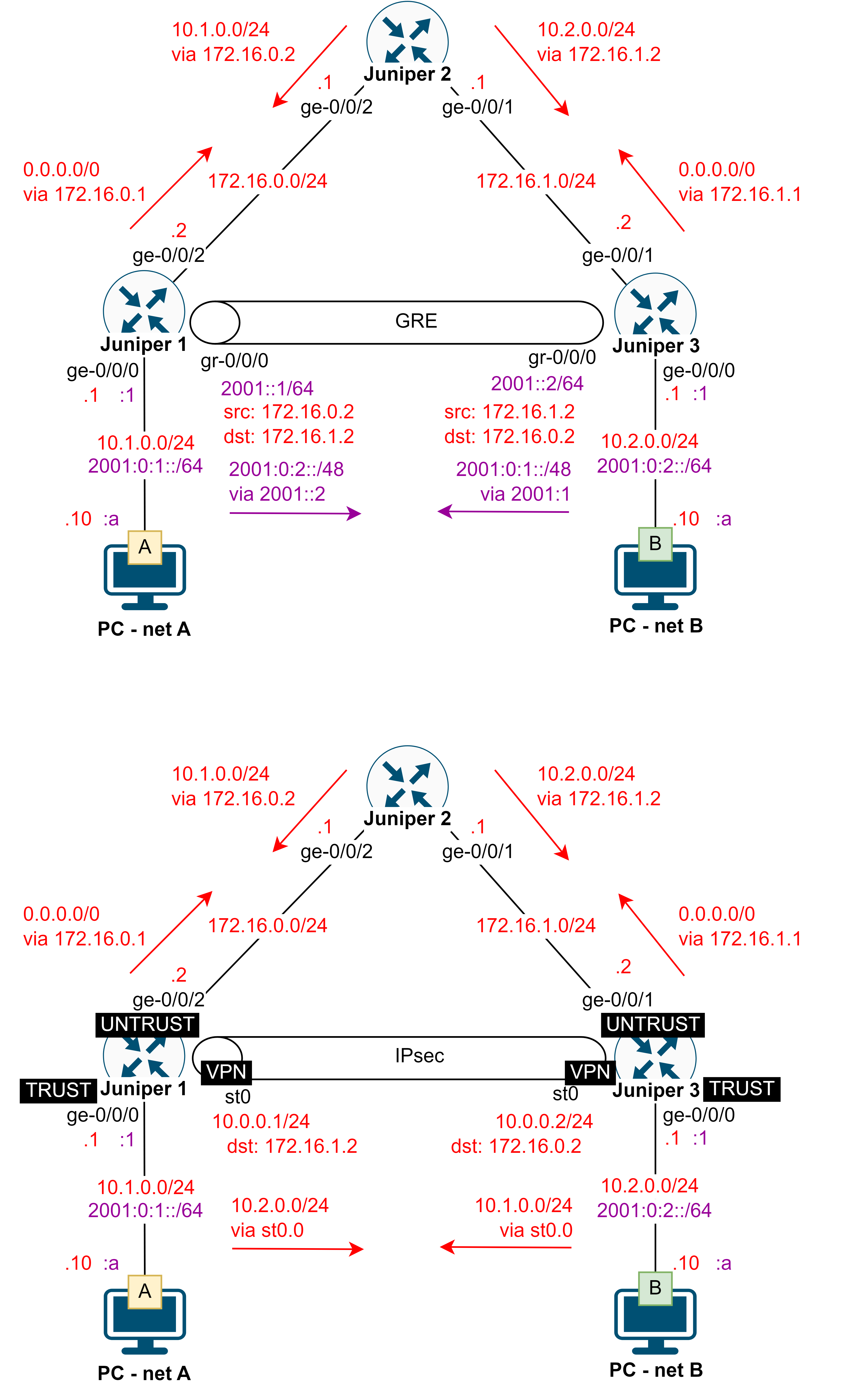
Nastavení IP adres a směrování
1. Nastavte IPv4 adresy dle topologie na všech Juniper
2. Nastavte statické nebo dynamické směrování pro IPv4 dle obrázku topologie
3. Zkontrolujte aplikaci nastavení - adresy, route
> show interfaces terse
> show route
4. Nastavte IP adresy a výchozí brány na koncových zařízeních
5. Vyzkoušejte komunikaci mezi sousedními zařízeními
IPv6 over IPv4 přes GRE tunnel
1. Zapněte směrování pro IPv6
# set security forwarding-options family inet6 mode packet-based
2. Nastavte IPv6 adresy dle topologie na Juniper 1 a Juniper 3
3. Zapnutí odesílání IPv6 router advertisement pro automatickou konfiguraci IPv6 na packet
# set protocols router-advertisement interface ge-0/0/0 prefix <IPv6 address
        of network on interface>/<prefix length>
4. Nastavte GRE tunel mezi Juniper 1 a Juniper 3 a nastavte mu IPv6 adresu
# set interfaces gr-0/0/0 unit 0 tunnel source <local IPv4 address>
        destination <remote IPv4 address>
# set interfaces gr-0/0/0 unit 0 family inet6 address <IPv6 address for
        tunnel interface>/<prefix length>
5. Vložte statickou route mezi Juniper 1 a Juniper 3 přes GRE tunel nebo aktivujte OSPFv3 pro rozhraní ge-0/0/0
a gr-0/0/
# set routing-options rib inet6.0 static route <IPv6 address of remote
        network> next-hop <IPv6 address of remote tunnel end>
Nastavení IPsec tunelu - násleudjící kroky provádějte na Juniper 1 aJuniper 3
1. Změňte security z packet-based na flow-based a restartujte zařízeních (restart a family mpls nejsou nutné na
verzi 25.2; family inet nejde nastavit na verzi 23.2)
# set security forwarding-options family inet mode flow-based set security
        forwarding-options family inet6 mode flow-based
# set security forwarding-options family mpls mode flow-based
# commit and-quit
> request system reboot
2. Nastavte security zóny, které budou povolovat všechno a přiřaďte je na rozhraní
# set security zones security-zone TRUST host-inbound-traffic system-services
        all
# set security zones security-zone TRUST host-inbound-traffic protocols all set
        security zones security-zone TRUST interfaces ge-0/0/
# set security zones security-zone UNTRUST host-inbound-traffic system-services
        all
# set security zones security-zone UNTRUST host-inbound-traffic protocols all
# set security zones security-zone UNTRUST interfaces ge-0/0/<x>
3. Nastavte povolení všeho pro komunikaci mezi zónami TRUST a UNTRUST
# set security policies from-zone TRUST to-zone UNTRUST policy policy match
        source-address any
# set security policies from-zone TRUST to-zone UNTRUST policy policy match
        destination-address any
# set security policies from-zone TRUST to-zone UNTRUST policy policy match
        application any
# set security policies from-zone TRUST to-zone UNTRUST policy policy then
        permit any
# set security policies from-zone UNTRUST to-zone TRUST policy policy match
        source-address any
# set security policies from-zone UNTRUST to-zone TRUST policy policy match
        destination-address any
# set security policies from-zone UNTRUST to-zone TRUST policy policy match
        application any
# set security policies from-zone UNTRUST to-zone TRUST policy policy then
        permit any
4. Potvrďte aktuální nastavení pomocí commit
5. Načtěte funkcionality pro IPsec a IKE, následně na výzvu restartujte CLI a ověřte dostupnost IKE
# run request system software add optional://junos-ike.tgz
# run show version | grep ike
6. Připravte IKE proposal pro vyjednání tunelu
# set security ike proposal IKE-PROP authentication-method pre-shared-keys
# set security ike proposal IKE-PROP lifetime-seconds 3600
# set security ike proposal IKE-PROP authentication-algorithm sha-256
# set security ike proposal IKE-PROP encryption-algorithm aes-256-cbc
# set security ike proposal IKE-PROP dh-group group24
7. Nastavte politiku pro IKE tunel včetně sdíleného hesla
# set security ike policy IKE-POL proposals IKE-PROP
# set security ike policy IKE-POL mode main
# set security ike policy IKE-POL pre-shared-key ascii-text <secret key>
8. Nastavte adresu druhého konce tunelu a odchozí rozhraní
# set security ike gateway IKE-GW ike-policy IKE-POL
# set security ike gateway IKE-GW address <IPv4 of remote device>
# set security ike gateway IKE-GW external-interface ge-0/0/<x>
9. Připravte IPsec proposal pro zabezpečení přenášených dat
# set security ipsec proposal IPSEC-PROP lifetime-seconds 1800
# set security ipsec proposal IPSEC-PROP protocol esp
# set security ipsec proposal IPSEC-PROP authentication-algorithm hmac-sha-512
# set security ipsec proposal IPSEC-PROP encryption-algorithm aes-256-cbc
10. Nastavte IPsec policy pro zabezpečení přenášených dat
# set security ipsec policy IPSEC-POL proposals IPSEC-PROP
# set security ipsec policy IPSEC-POL perfect-forward-secrecy keys group24
11. Definujte bránu a ustavení tunelů pro IPsec
# set security ipsec vpn IPSEC-VPN ike gateway IKE-GW
# set security ipsec vpn IPSEC-VPN ike ipsec-policy IPSEC-POL
# set security ipsec vpn IPSEC-VPN establish-tunnels immediately
# set security ipsec vpn IPSEC-VPN bind-interface st0.0
12. Nastavte rozhraní pro IPsec tunel
# set interfaces st0 unit 0 family inet address <IP address>/<prefix
        length>
13. Nastavte statickou route do druhé sítě přes IPsec tunel
# set routing-options rib inet.0 static route <remote network
        address>/<prefix length> next-hop st0.0
14. Vytvořte další security zónu pro rozhraní tunelu
# set security zones security-zone VPN host-inbound-traffic system-services all
# set security zones security-zone VPN host-inbound-traffic protocols all
# set security zones security-zone VPN interfaces st0.0
15. Definice adresy lokální a vzdálené sítě
# set security address-book global address NET-LOCAL <IP address of local
        network>/<prefix length>
# set security address-book global address NET-REMOTE <IP address of remote
        network>/<prefix length>
16. Definice security policy mezi loklání zónou a VPN - definice provozu, který půjde tunelem
# set security policies from-zone TRUST to-zone VPN policy policy match
        source-address NET-LOCAL
# set security policies from-zone TRUST to-zone VPN policy policy match
        destination-address NET-REMOTE
# set security policies from-zone TRUST to-zone VPN policy policy match
        application any
# set security policies from-zone TRUST to-zone VPN policy policy then permit
# set security policies from-zone VPN to-zone TRUST policy policy match
        source-address NET-REMOTE
# set security policies from-zone VPN to-zone TRUST policy policy match
        destination-address NET-LOCAL
# set security policies from-zone VPN to-zone TRUST policy policy match
        application any
# set security policies from-zone VPN to-zone TRUST policy policy then permit
17. Ověřte funkčnost tunelu (ping, traceroute) a následující show příkazy (v případě, že následující showpříkazy
nefungují je doporučeno provést reboot Juniper)
> show security ike security-associations
> show security ipsec security-associations
> show security ipsec statistics